Old Rose. Seamless Patterns: Turning Abstract Floral Designs into Confident Creative Projects
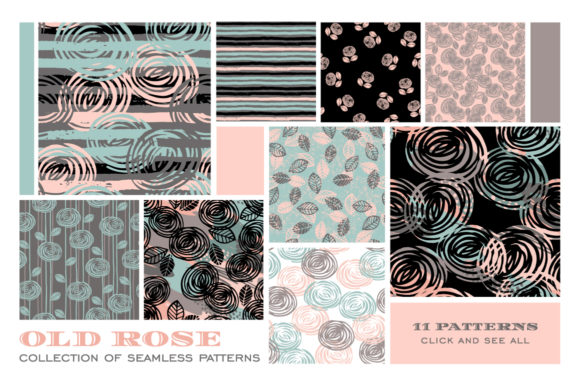
If you have ever spent hours hunting for the perfect decorative background only to end up with a pattern that repeats awkwardly or looks flat on fabric, you already know the frustration. Old Rose. Seamless Patterns aims to solve that exact problem. This collection brings together 11 abstract floral seamless patterns built around roses, with hand-drawn textures that feel modern rather than fussy. You get an EPS 10 file containing all patterns, plus individual JPG files at 300 dpi and layered PSD files. The package is positioned for paper goods, book covers, fabric, interior decor, and countless other uses. But a good tool set does not guarantee a good result if you overlook a few critical details. Let me walk you through what actually matters when you choose and use a resource like this, so you avoid the common pitfalls that turn a promising design bundle into a source of regret.
Why Pattern Choices Go Wrong and How to Get Them Right
The biggest mistake people make with seamless patterns is treating them as decorative afterthoughts. You find a beautiful rose motif, drop it onto your project, and assume it will work. Then the repeat shows a visible seam, the colors clash with your text, or the pattern overwhelms your layout. Old Rose. Seamless Patterns is designed to help you avoid that, but only if you approach it with a clear plan.
Mistake One: Ignoring the Repeat Structure
Even though the files are marketed as seamless, not all seamless patterns handle real-world application equally well. A pattern that looks continuous on a screen can break when printed across a large surface or wrapped around a curved object. The hand-drawn quality of these rose patterns means they have organic edges and natural texture variation, which usually helps hide repeat lines. But you still need to test the tile before committing.
What to do instead: Open the EPS or PSD file and create a 2×2 or 3×3 tile preview. Zoom in at 100% and look for any obvious lines where the pattern repeats. If you are designing for fabric, request a physical swatch from your printer after setting the pattern scale. When working digitally, apply the pattern to a mockup of your actual product—whether that is a notebook cover, a throw pillow, or a gift wrap sheet—and check it at full size. A small preview on your monitor hides a lot.
Mistake Two: Overlooking Scale and Proportion
Old Rose patterns feature abstract floral motifs with hand-drawn detail. That detail can be a strength if you scale the pattern correctly for your medium, or a liability if you do not. A common error is using the pattern at its native size without considering how it will read on the final object. A rose motif that looks elegant on a phone case may look chaotic on a duvet cover, and the same motif scaled down for a business card may lose all its texture and become a muddy blur.
A better approach: Open the PSD file—since it offers layers, it is the most flexible format for making adjustments. Duplicate the pattern layer and experiment with scaling it between 50% and 200%. For large surfaces like wallpaper or upholstery, a bigger scale often preserves the hand-drawn feel and keeps the pattern from feeling repetitive. For small items like stationery or gift tags, scale down but check that the rose shapes and texture strokes remain distinct. If the detail disappears, that scale is too small for that pattern.
File Formats Matter More Than You Think
The Old Rose. Seamless Patterns bundle includes three file types: EPS 10, JPG at 300 dpi, and PSD. Each serves a different purpose, and using the wrong one for your workflow creates extra work or reduces quality.
When to use EPS 10
The EPS file contains all 11 patterns in a single vector-based file. This is ideal if you work in Adobe Illustrator, CorelDRAW, or Affinity Designer and need to scale the patterns without losing resolution. However, EPS 10 is an older specification. While it opens in most modern software, some features like transparency and certain blend modes may not transfer perfectly. If you notice unexpected color shifts or missing texture details when opening the EPS, switch to the PSD file instead.
When to use PSD
The 11 individual PSD files are layered, which means you can turn off elements, adjust opacity, change blending modes, or recolor specific parts of the pattern without damaging the original. This is the best choice for customizing the patterns to fit your brand palette or project color scheme. The catch is file size—PSDs can be bulky, and they require Photoshop or a compatible editor. If you are a beginner working in Canva or a simple layout tool, the PSD files may not be directly usable.
When to use JPG
The 300 dpi JPG files are ready to place directly into most software. They are the quickest option for mockups, social media graphics, or print-on-demand products. But JPGs are flattened and compressed, so you cannot edit individual elements. If you need to change a rose color or remove a texture layer, you are stuck. The 300 dpi resolution is sufficient for most print applications, but if your printer requires 600 dpi or you are printing on a large format, the JPG may pixelate when scaled up too much.
Practical advice: Keep all three file types in your library. Use the EPS or PSD as your master copy for editing. Export a JPG only after you have finalized the design for a specific project. That way you preserve the ability to make changes later.
Color, Texture, and the Hand-Drawn Aesthetic
The rose patterns in this collection are described as having trendy hand-drawn textures and a modern abstract style. That description tells you something important: these are not photorealistic roses. They are artistic interpretations with visible brush or pencil strokes, uneven edges, and subtle color variation. Some users expect a crisp, uniform look and are disappointed when they see texture. That is a misunderstanding, not a flaw in the design.
Embracing the Imperfect
Hand-drawn textures work beautifully for projects that want a personal, artisanal, or contemporary feel. They pair well with sans-serif typography, muted color palettes, and natural materials. They struggle in highly formal or minimalist contexts where every line must be sharp and every color flat. Before purchasing or using this pack, ask yourself whether your project benefits from that organic quality. If you are designing luxury wedding stationery with a classic Victorian motif, you may want something more refined. If you are creating a lifestyle blog header, a fabric line for bohemian decor, or a branding set for a small botanical business, the hand-drawn look is likely a perfect fit.
Color Matching and Output
The patterns come in a specific color range typical of the Old Rose. aesthetic—likely soft pinks, dusty mauves, muted greens, and neutral backgrounds. These colors look different on every screen and even more different when printed. The 300 dpi JPGs use the RGB color space, which works fine for digital use but can shift when converted to CMYK for printing. The EPS and PSD files may be RGB as well unless explicitly noted otherwise.
How to avoid a color disaster: If you plan to print these patterns, request a CMYK conversion from your printer or convert the files yourself using color management software. Print a small test on the actual paper or fabric you intend to use. What looks like a dusty rose on your monitor may come out as a muddy brown on uncoated paper or a neon pink on certain synthetic fabrics. Also, check whether the patterns use spot colors or process colors—this information is usually visible in the PSD layer names or EPS swatch panel.
Matching the Pattern to Your Medium
One of the strengths of Old Rose. Seamless Patterns is its versatility, but that versatility can tempt you to use one pattern everywhere without considering context. A pattern that works beautifully as a phone case background may be too busy as an entire wallpaper. A pattern that looks subtle on a fabric swatch may become overwhelming when repeated across a large curtain panel.
Practical Guidelines by Medium
- Paper goods (cards, notebooks, wraps): Choose patterns with moderate detail and a clear focal point. The hand-drawn texture adds warmth without competing with printed text. Test at actual print size to ensure the rose motifs are legible.
- Book or album covers: Lay the pattern behind a solid color block or use it as a border element. Placing a full repeat across an entire cover can make the title hard to read. The PSD file lets you fade the pattern opacity or mask it behind your typography.
- Fabric and apparel: Consider the drape of the garment and how the pattern will align at seams. Seamless repeats are essential here, but you still need to check that the rose orientation looks natural when the fabric hangs. Avoid scaling the pattern so large that a single rose lands awkwardly on a pocket or shoulder seam.
- Interior decor (pillows, curtains, wallpaper): Large-scale patterns with open negative space tend to work best. The abstract floral motifs in this collection often have enough breathing room between elements to avoid a cluttered look. If you are using wallpaper, order a sample roll or printed sample sheet and view it on the actual wall before committing.
What to Check Before You Buy or Download
Before you invest in any pattern bundle, including Old Rose. Seamless Patterns, verify a few practical details that directly affect your experience.
- License terms: Does the license allow commercial use? Can you use the patterns on products you sell, or is it limited to personal projects? Some bundles restrict use in certain quantities or require attribution. Read the terms before you download, not after you have already built a product line.
- Software compatibility: The EPS 10 format opens in most vector editors, but older versions of some software may not handle it well. The PSD files require Photoshop or a compatible application like Affinity Photo or GIMP. If you work exclusively in Canva or Inkscape, test a sample file first if possible.
- Pattern variety: Eleven patterns is a solid number, but check whether the pack offers enough visual diversity for your project. Are there both dense and airy patterns? Do the color schemes vary enough to give you choices? Look at the preview images carefully—what you see on the product page is what you get.
- Resolution for your specific output: 300 dpi is standard for most print work, but if you need large-format prints like posters or fabric rolls, calculate whether that resolution will hold up at your intended dimensions. A 300 dpi JPG at 12×12 inches is fine for a small quilt block, but if you need a 48×48 inch wallpaper panel, you may need to scale the pattern in a vector format to keep the quality.
Avoiding Buyer’s Remorse
Many creative buyers collect pattern packs but never actually use them. The files sit in a folder, and when a project comes up, they still feel unprepared. That happens when you buy based on aesthetics alone without thinking about your actual workflow. Old Rose. Seamless Patterns includes three file formats precisely to bridge that gap—you can keep the EPS for future editing, use the PSD for current projects, and drop the JPG into quick mockups. If you organize your files by color family or pattern density and tag them with keywords like "rose," "floral," "hand-drawn," or "abstract," you will actually find them when you need them.
Another overlooked detail: texture complexity affects file size and rendering time. The hand-drawn strokes and layered elements in these patterns can make the PSD files large. If you are working on an older computer or using software that struggles with heavy files, consider opening the JPG version first for layout work and switching to the PSD only when you need to edit. That saves frustration without losing flexibility.
The Bottom Line for Creators and Professionals
Old Rose. Seamless Patterns offers a carefully designed set of abstract floral repeats that can lift your projects from simply decorated to visually interesting. The hand-drawn textures give each pattern a contemporary, personal feel that mass-produced vector patterns often lack. Whether you are a small business owner designing your own product packaging, a freelancer building a brand identity, or a hobbyist creating fabric for a quilting project, this bundle can save you significant time and effort—provided you use it thoughtfully.
Test the repeat, adjust the scale, match the file format to your software, and verify colors for your output medium. Those simple checks will turn a good pattern pack into a reliable creative resource. And if you are still unsure, start with one pattern from the set on a single project. See how it behaves, how it prints, and how it feels in context. The patterns will still be there for your next project, and you will know exactly which ones work best for your style and your audience.