Space Abstract Seamless Patterns: A Practical Design Resource for Modern Projects
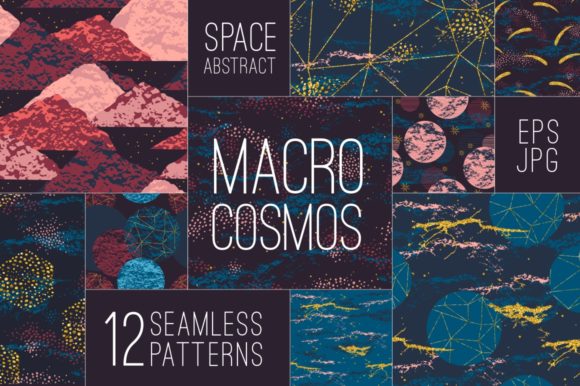
When you’re building a brand, designing a collection, or producing assets for clients, the quality and versatility of your visual toolkit directly affect your output. Seamless patterns that combine hand-drawn texture with geometric precision offer a flexible foundation for everything from fabric prints to digital backgrounds. The Space Abstract Seamless Patterns set delivers exactly that: twelve vector and raster files built around space-inspired motifs, glitter accents, and geometric shapes. Understanding how to integrate these assets into your existing workflow can save time, improve consistency, and open up new creative possibilities.
What Makes This Set Stand Out in Your Asset Library
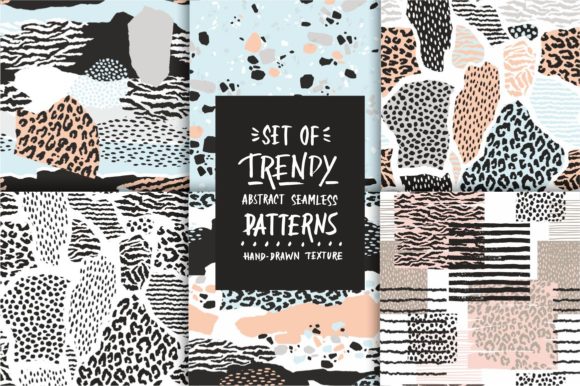
The collection includes 12 EPS 10 files and 12 corresponding JPG files at 300 dpi. The vector format ensures you can scale each pattern from a small patch to a full billboard without losing detail—ideal for interior decor, sportswear, or book covers. The JPG versions serve as ready‑to‑use previews or final assets for projects that don’t require a vector workflow. Each pattern blends hand‑drawn texture (think soft charcoal strokes and organic lines) with glittery highlights and crisp geometric elements such as stars, circles, and intersecting lines. The result is a mix of earthy, tactile feel and modern precision that fits nicely into contemporary design language.
Because the files are organized as individual seamless tiles, you can apply them as fill patterns in software like Adobe Illustrator, Affinity Designer, or Canva. The EPS 10 format is widely compatible with most vector editors, even older versions, so you don’t have to worry about software updates breaking your workflow. The 300 dpi JPGs are print‑ready at full resolution, making them suitable for direct use in production if you prefer a raster workflow.
Before a Project: Planning and Asset Curation
Before you start designing, you often gather reference material, create mood boards, and define a visual direction. The Space Abstract Seamless Patterns can serve as both inspiration and a concrete starting point. Browse the thumbnails to identify two or three patterns that match your brand colors or project theme. Drop them into a mood board alongside typography samples and photographic references. Because the set includes both vector and raster files, you can quickly test how a pattern looks at different scales and on various backgrounds without committing to a final layout.
If you work with a team, sharing one or two EPS files as placeholders helps everyone visualize the intended aesthetic early. This reduces back‑and‑forth during the production phase. You can also use the patterns to define a color palette: extract dominant and accent colors directly from the glitter and geometric elements, then apply those colors to your own graphics, icons, or typography. This approach builds cohesion from the start.
During a Project: Direct Implementation and Iteration
Once you’re in the thick of design work, the patterns become a usable building block. For a fabric print or wallpaper design, open an EPS file in your vector editor, ungroup the elements, and customize the colorways to match your collection. Because the hand‑drawn textures are separate from the geometric overlays, you can adjust the opacity, scale, or rotation of each layer independently. This flexibility lets you create variations—for example, a version with heavier glitter for a party banner, or a muted version for a bedroom interior.
For digital projects (social media templates, blog backgrounds, website headers), the JPG files are convenient. Import them directly into Canva, Photoshop, or even Keynote. Since they are 300 dpi and seamless, you can set a pattern as a repeating background without visible seams. In web design, export the JPG at screen resolution (72 dpi) and use it as a CSS background image or within a mockup. The seamless nature means you never have to manually align tiles—a time saver when iterating on layout after layout.
If you produce sportswear or activewear, consider how the glitter and geometric elements translate onto textile. The vector file allows you to create an all‑over print (AOP) with precise registration. Small geometric elements work well as accent stripes or panel inserts, while the hand‑drawn texture can be scaled up for a more organic look across a t‑shirt front. Test a proof on fabric using a print‑on‑demand service; the 300 dpi JPG gives you a reliable preview of final color density.
After a Project: Quality Control and Consistency Checks
After you finish a run of designs, you’ll want to verify that the patterns print correctly and match across all media. Use the vector files to check that the seamless tile repeats without distortion when scaled. Overprint previews in Illustrator or InDesign will show you if any transparency or glitter effects cause issues with spot colors. For fabric or wallpaper, request a physical sample and compare it to the original JPG on a calibrated monitor. Because the set includes both formats, you have a raster reference that remains consistent even if the vector file is later edited.
Archive the patterns with your project files, adding tags like “space texture,” “geometric seamless,” or “glitter pattern” for future retrieval. Since the EPS 10 format is non‑proprietary, you can open it years later without needing a specific software version—this is valuable for long‑term brand guidelines or product lines that get refreshed season after season.
Practical Implementation Tips for Different Use Cases
- Paper and stationery: Use the JPG files directly as full‑page backgrounds in InDesign. For digital paper, create a 12x12 inch document at 300 dpi and place the pattern as a linked image. The seamless tile will fill the entire spread without repeating edges. If you need to adjust the pattern position, use the vector version to offset the artwork before exporting.
- Interior decor (wallpaper, fabric, home accessories): Scale the EPS file to match the physical repeat size. For example, a 24‑inch repeat on wallpaper requires the pattern to tile perfectly at that dimension—check the bounding box and adjust if needed. Use the hand‑drawn texture layer alone for a subtle, organic bedroom wall, or combine with geometric elements for a bold accent wall.
- Cover and book design: Place the pattern on the cover with a discreet opacity so it doesn’t overpower the title. The glitter elements can add a premium feel when printed with a spot gloss or foil layer. Test the raster JPG with your printer’s profile to ensure the highlights remain punchy.
- Sportswear and activewear: Convert the EPS to a repeatable pattern in your apparel CAD software. Because the geometric elements are clean vectors, they knit well with minimal distortion on fabric. Hand‑drawn textures can be used as sublimation prints with a soft hand feel.
- Digital assets (social media, blog, website): Resize the JPG to the largest required area, then let the program repeat the pattern naturally. For parallax scrolling backgrounds, use the seamless property to create an infinite loop without visible seams.
Organizing Your Pattern Library for Long‑Term Efficiency
An asset collection is only as useful as its organization. After downloading the 12 EPS and 12 JPG files, create a folder structure that separates vectors from rasters, and within each folder add a subfolder for thumbnails. Rename the files with a consistent prefix (e.g., SPACE_01, SPACE_02) and include a brief descriptor in the file name itself (e.g., SPACE_01_handdrawn_glitter_stars.eps). This makes search easy, especially when you have hundreds of patterns in your library.
Use bridge or a digital asset management (DAM) tool to tag the files with keywords: “space”, “geometric”, “glitter”, “seamless”, “hand drawn”, “abstract”. If you share patterns with collaborators, include a readme file with notes on color handling, recommended scale range, and any transparency settings. Because the EPS 10 format preserves layers, you can also supply a layered version for clients who want to customize—this adds a service layer to your offering.
Integrating with Other Tools and Platforms
The set works well across common design ecosystems. In Adobe Illustrator, simply open the EPS and drag the art to the Swatches panel to create a pattern swatch. Affinity Designer users can place the EPS file and use the “Tile Fill” tool. For Canva, import the JPG as an image and set the tiling behavior in the background settings. If you use print‑on‑demand services like Printful or Redbubble, upload the JPG directly—the 300 dpi ensures no pixelation at typical print sizes.
When working with fabric printers, send them the EPS file along with a PDF proof. Many textile printers prefer vector files for repeat patterns because they can adjust the scale without quality loss. The glitter effects, which are vector shapes with a white stroke or gradient, can be interpreted as metallic accents if the printer supports silver or gold inks.
Quality Control and Consistency Across Media
To maintain consistency across different output devices, calibrate your monitor and test the pattern on both screen and print. The hand‑drawn texture may appear slightly subdued on screen compared to print—adjust contrast as needed. For the geometric elements, check that sharp angles remain crisp at small scales (e.g., on a business card). The EPS files preserve vector sharpness, so scaling down is safe; the JPGs should be used at or near 100% to avoid softening.
If you use multiple patterns together (say, on a bedding set and matching pillow shams), verify that the scale ratio looks balanced. The seamless property will work across all 12 patterns, but mixing a large‑scale hand‑drawn pattern with a tiny geometric grid might feel disjointed—try pairing textures of similar scale or using one as a subtle backdrop.
For long‑term use, back up the original EPS files in a cloud folder and a local drive. Resist the urge to edit and save over the originals; instead, create copies for each project. This practice ensures you always have a pristine version for new client work.
Integrating a well‑crafted seamless pattern set into your design workflow streamlines production, reduces repetitive setup, and lets you focus on the creative decisions that matter. The Space Abstract Seamless Patterns offer a balanced toolkit of texture, sparkle, and structure—ready to adapt to your next project, whatever form it takes.